Desktop-Anwendungen: Unterschied zwischen den Versionen
Keine Bearbeitungszusammenfassung |
|||
| Zeile 60: | Zeile 60: | ||
[[file:Videodownloadhelper.png|frameless|upright=3.0|link=|VideoDownloadHelper]] | [[file:Videodownloadhelper.png|frameless|upright=3.0|link=|VideoDownloadHelper]] | ||
[[file:Firefox.png|24px|link=https://de.wikipedia.org/wiki/Mozilla_Firefox]] https://addons.mozilla.org/firefox/addon/video-downloadhelper | |||
[[file:Chromium.png|24px|link=https://de.wikipedia.org/wiki/Chromium_(Browser)]] https://chromewebstore.google.com/detail/video-downloadhelper/lmjnegcaeklhafolokijcfjliaokphfk | |||
<br> | |||
<br> | |||
==Büro== | ==Büro== | ||
| Zeile 77: | Zeile 81: | ||
[[file:Base.png|42px|link=LibreOffice#Base]] [[LibreOffice#Base|Base]] (Datenbankmanagementsystem) | [[file:Base.png|42px|link=LibreOffice#Base]] [[LibreOffice#Base|Base]] (Datenbankmanagementsystem) | ||
<br> | |||
<br> | |||
==Persönliches Informations System== | ==Persönliches Informations System== | ||
[[file:thunderbird.png|42px|link=Thunderbird]] [[Thunderbird]] (E-Mail-Programm und Personal Information Manager) | [[file:thunderbird.png|42px|link=Thunderbird]] [[Thunderbird]] (E-Mail-Programm und Personal Information Manager) | ||
<br> | |||
<br> | |||
==Grafik== | ==Grafik== | ||
[[file:gimp.png|42px|link=GIMP]] [[GIMP]] (Bildbearbeitungsprogramm) | [[file:gimp.png|42px|link=GIMP]] [[GIMP]] (Bildbearbeitungsprogramm) | ||
| Zeile 95: | Zeile 96: | ||
[[file:darktable.png|42px|link=darktable]] [[darktable]] (Bildberabeitung und Fotoverwaltung) | [[file:darktable.png|42px|link=darktable]] [[darktable]] (Bildberabeitung und Fotoverwaltung) | ||
<br> | |||
<br> | |||
==3D Suite== | ==3D Suite== | ||
[[file:blender.png|42px|link=Blender]] [[Blender]] (3D-Grafiksoftware) | [[file:blender.png|42px|link=Blender]] [[Blender]] (3D-Grafiksoftware) | ||
<br> | |||
<br> | |||
==Video== | ==Video== | ||
[[file:kdenlive.png|42px|link=KDEnlive]] [[KDEnlive]] (Videoschnittprogramm) | [[file:kdenlive.png|42px|link=KDEnlive]] [[KDEnlive]] (Videoschnittprogramm) | ||
| Zeile 108: | Zeile 112: | ||
[[file:vlc.png|42px|link=VLC Media Player]] VLC Media Player | [[file:vlc.png|42px|link=VLC Media Player]] VLC Media Player | ||
<br> | |||
<br> | |||
==Musik== | ==Musik== | ||
[[file:mixxx.png|92px|link=Mixxx]] (DJing-Software mit Digital-Vinyl-Funktionen) | [[file:mixxx.png|92px|link=Mixxx]] (DJing-Software mit Digital-Vinyl-Funktionen) | ||
| Zeile 114: | Zeile 120: | ||
[[file:foobar2000.png|42px|link=foobar2000]] [[foobar2000]] (Audio Player) | [[file:foobar2000.png|42px|link=foobar2000]] [[foobar2000]] (Audio Player) | ||
<br> | |||
<br> | |||
==System== | ==System== | ||
[[file:virtualbox.png|42px|link=VirtualBox]] [[VirtualBox]] (Hypervisor) | [[file:virtualbox.png|42px|link=VirtualBox]] [[VirtualBox]] (Hypervisor) | ||
<br> | |||
<br> | |||
==Browser== | ==Browser== | ||
[[file:firefox.png|42px|link=Firefox]] [[Firefox]] ("Linux" Webbrowser) | [[file:firefox.png|42px|link=Firefox]] [[Firefox]] ("Linux" Webbrowser) | ||
Version vom 11. Januar 2025, 02:09 Uhr
Hauptseite > Technik > EDV
 macOS Software
 Ubuntu Software
 Windows Software
 WorldWideWeb (Mit Microsoft Edge & Google Chrome kann man, auf allen Betriebssystemen, eine Website als App installieren.)
Bildungsapps
Liste mit guten Apps auf Schwarzatal.org.
Download Manager
Programme um Dateien runter zu laden. Praktisch ein Videorecorder, damit man nichts aus der Mediathek versäumt.
JDownloader

GRATIS Programm, welches von Spenden, und leider einer irreführenden Werbeeinblendung lebt. Deshalb spende ich nichts.

https://jdownloader.org/download/index
App Center: JDownloader
https://jdownloader.org/download/index
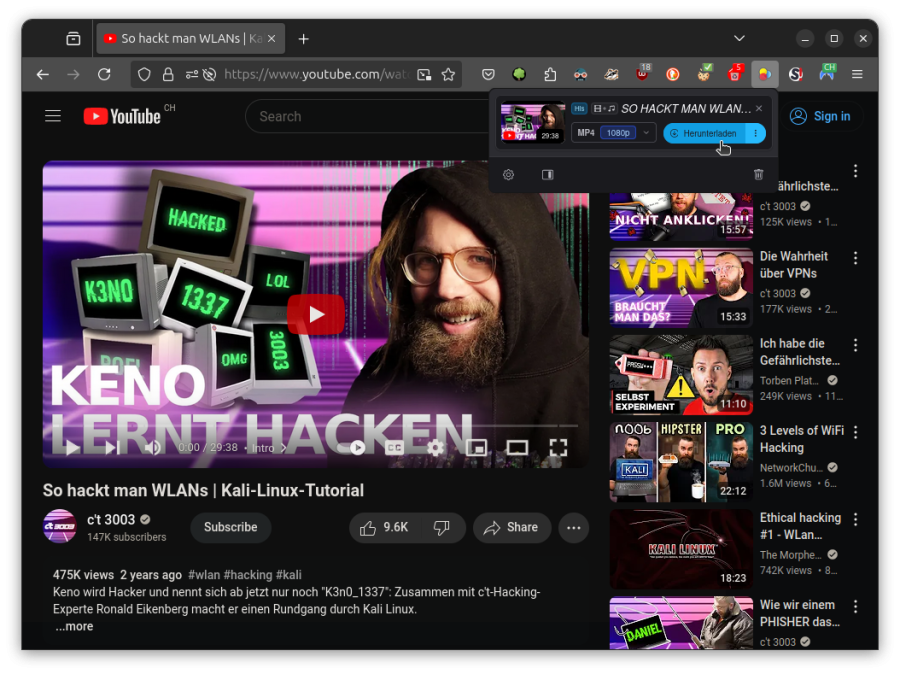
Video DownloadHelper
Bis vor kurzen machte manchmal JDownloader mit der ORF Mediathek Probleme dürfte aber mit Update behoben worden sein. Mit Video DownloadHelper Browser Addon, ging es aber immer:
https://www.downloadhelper.net/
(benötigt Begleitanwendung, welche bei der ersten Nutzung automatisch heruntergeladen und Installiert wird. Ist also kein reines Browser AddOn. Und nach einer Zeit muss man eine Lizenz kaufen.)
 https://addons.mozilla.org/firefox/addon/video-downloadhelper
 https://chromewebstore.google.com/detail/video-downloadhelper/lmjnegcaeklhafolokijcfjliaokphfk
Büro
 ("Linux" Office)
 Writer (Textverarbeitung)
 Calc (Tabellenkalulation)
 Impress (Präsentation)
 Draw (Zeichnungen)
 Math (Formeleditor)
 Base (Datenbankmanagementsystem)
Persönliches Informations System
 Thunderbird (E-Mail-Programm und Personal Information Manager)
Grafik
 GIMP (Bildbearbeitungsprogramm)
 (Bildbearbeitung)
 darktable (Bildberabeitung und Fotoverwaltung)
3D Suite
 Blender (3D-Grafiksoftware)
Video
 KDEnlive (Videoschnittprogramm)
 HandBrake (Videokonverter)
 OBS Studio (Bildschirmaufnahme)
 VLC Media Player
Musik
 (DJing-Software mit Digital-Vinyl-Funktionen)
 Kid3 (Editor für Meta-Informationen [Komponist, Titel, Interpret usw.] in Audio-Dateien)
 foobar2000 (Audio Player)
System
 VirtualBox (Hypervisor)
Browser
 Firefox ("Linux" Webbrowser)